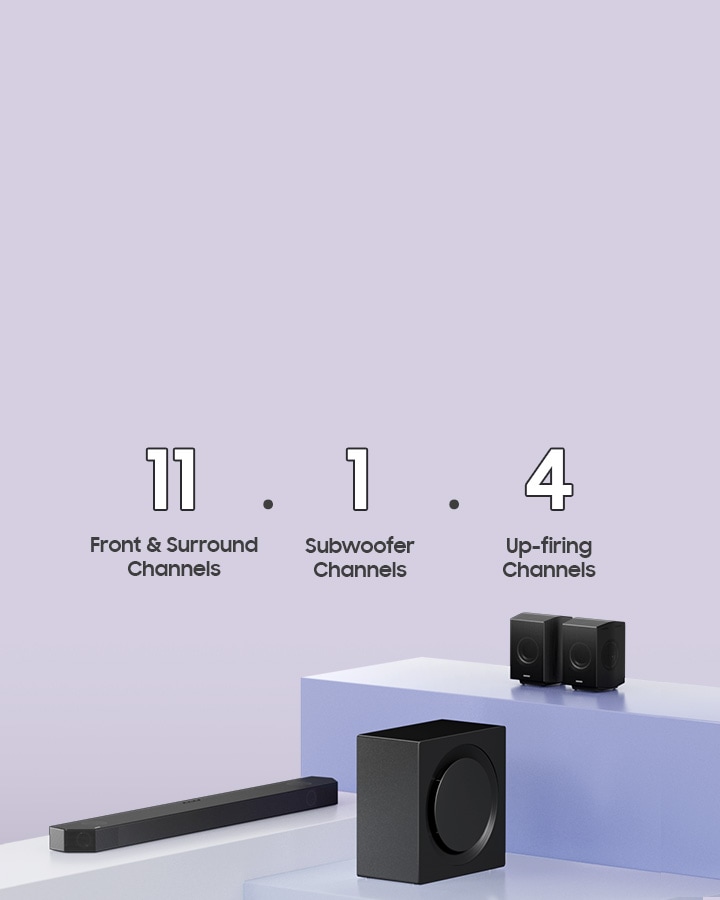
Confused by soundbar numbers? You’re not alone. Our guide on Sound Bar Channels Explained helps you understand 2.1, 5.1, and beyond, so you can choose the perfect audio system.
These numbers, often referred to as channels, can seem like a secret code. But understanding them can transform your audio experience. Imagine watching your favorite movie and feeling like you’re right in the middle of the action or listening to a song and hearing every note perfectly.
By the end of this article, you’ll have the clarity you need to choose the perfect soundbar, enhancing every sound in your home. Let’s unlock the mystery behind those channels and elevate your entertainment setup.
Soundbars have become popular audio devices for enhancing TV sound. Yet, many people find the term “channels” confusing. Understanding channels is important to get the best sound from your soundbar. This section, Channels Explained, will break down the meaning of channels and how they impact your listening experience.
What Are Soundbar Channels?
Channels in a soundbar refer to the number of distinct audio outputs. Each channel is like a path for sound to travel through. A basic soundbar might have 2.0 channels. This means it has two outputs, usually left and right.
Why Do Channels Matter?
More channels often mean better sound quality. They allow for more detailed audio separation. For instance, a 5.1 channel soundbar offers surround sound. This means five audio paths and one subwoofer. It can create a more immersive experience.
Configuration
Description
2.0 Channel
Two speakers, no subwoofer. Basic stereo sound.
2.1 Channel
Two speakers with a subwoofer. Adds bass.
5.1 Channel
Five speakers and a subwoofer. Surround sound setup.
7.1 Channel
Seven speakers with a subwoofer. Advanced surround sound.
Understanding.1 In Channel Configurations
The .1 in channel configurations refers to a subwoofer. The subwoofer handles low-frequency sounds, enhancing bass. This is why a 2.1 system can sound richer than a 2.0 system.
Sound Bars for TV 16-inch, Cinematic TV Sound Bar with Impactful Bass, Bluetooth Soundbar for TV with Remote Control, Wall Mountable TV Speakers Sound Bar Works with Traditional or Smart TV
Think about your room size and use. A 2.0 or 2.1 might suit a small room. A 5.1 or 7.1 setup is better for a home theater. More channels provide a more immersive sound experience.
Types Of Channels
Soundbars are popular for enhancing TV audio. They are slim, stylish, and deliver better sound than built-in TV speakers. Understanding the types of channels in a soundbar is important. Channels determine how sound is distributed. This affects your listening experience. Let’s explore different channel types.
Stereo Channels
Stereo channels are the most basic setup in soundbars. They consist of two channels: left and right. This setup is ideal for simple audio needs. It’s great for music and TV shows with minimal sound effects.
Stereo channels create a two-dimensional soundstage. This means sound moves from one side to the other. This provides a basic sense of direction. Here are some key features:
Left and Right Speakers: Create basic spatial sound.
Ideal for Music: Best for listening to stereo tracks.
Simple Setup: Easy to connect and use.
Stereo soundbars are often more affordable. They are suitable for small rooms. If you prefer simple audio without complex setups, stereo channels are a good choice.
Features
Details
Soundstage
Two-dimensional
Best for
Music, basic TV audio
Surround Sound Channels
Surround sound channels provide an immersive audio experience. They offer more than just left and right sound. This setup includes additional speakers. These speakers are placed around the room.
With surround sound, you hear sounds from all directions. This creates a three-dimensional audio environment. Common setups include 5.1, 7.1, or even more channels:
5.1 System: Five speakers and one subwoofer.
7.1 System: Seven speakers and one subwoofer.
Immersive Experience: Perfect for movies and gaming.
Surround sound is ideal for home theaters. It enhances action scenes and special effects. If you enjoy a cinema-like experience, consider a soundbar with surround sound channels.
System
Speakers
5.1
5 speakers + 1 subwoofer
7.1
7 speakers + 1 subwoofer
Subwoofer Channels
Subwoofer channels focus on low-frequency sounds. They handle the bass. This is the deep, rumbling sound you feel. Subwoofers are important for a full audio experience.
A subwoofer channel can be built-in or separate. Here’s what you need to know:
Built-in Subwoofer: Convenient, but may lack power.
Separate Subwoofer: Offers deeper bass and more impact.
Adjustable Levels: Control bass intensity based on preference.
Subwoofers are crucial for action movies and music with heavy bass. They add depth to explosions and beats. If you love feeling the sound, look for a soundbar with a strong subwoofer channel.
Type
Pros
Built-in
Space-saving, easy setup
Separate
Better bass, more powerful
Importance Of Channels
Understanding what soundbar channels mean can transform your audio experience. Channels refer to the number of sound sources or speakers integrated into the soundbar. They play a crucial role in the depth and quality of sound produced. Knowing the importance of channels helps you choose a soundbar that suits your needs, ensuring an immersive listening experience.
Channels in a soundbar determine the sound quality and surround sound effect. A higher number of channels often means a richer audio experience. For those who enjoy movies or music, more channels can enhance the clarity and depth of sound.
Why More Channels Matter
More channels allow for a detailed soundscape. Imagine the difference between listening to music on a single speaker versus a multi-channel system. Each channel can deliver specific audio elements, creating a more immersive experience.
Configuration
Description
2.0 Channel
Stereo sound with two speakers. Basic setup for listening.
2.1 Channel
Includes a subwoofer. Adds depth with bass.
5.1 Channel
True surround sound. Five speakers and a subwoofer.
7.1 Channel
Enhanced surround sound. Seven speakers and a subwoofer.
Choosing The Right Channels
Consider your room size and audio needs. Larger rooms may benefit from more channels. Smaller spaces might not need extensive setups. Think about what suits your listening preferences and environment.
Benefits Of Multi-channel Soundbars
Improved audio quality
Greater depth and clarity
Enhanced movie and music experience
Multi-channel soundbars offer an array of benefits for audio enthusiasts. They create a surround sound effect, making you feel part of the action.
Common Channel Configurations
Understanding the channel configurations on a soundbar can enhance your listening experience. Channels refer to the number of distinct audio paths present in a sound system. Each channel is assigned to a specific speaker or speaker group. This setup creates a surround sound effect, making the audio more immersive. Below, we explore common channel configurations found in soundbars, explaining what each means and how they can affect your audio experience.
2.0 Channel
A 2.0 channel soundbar setup includes two speakers: a left and a right channel. This is the most basic configuration. It provides stereo sound, which is ideal for smaller rooms or simple audio needs. The lack of a subwoofer means it might not produce deep bass. However, it still delivers clear audio for everyday viewing.
Key Features of 2.0 Channel:
Two speakers: left and right
No subwoofer
Ideal for music and TV shows
Compact design
For those seeking simplicity and affordability, the 2.0 channel is a good choice. It suits users who prefer a straightforward setup without the need for additional bass.
2.1 Channel
The 2.1 channel configuration builds on the 2.0 channel by adding a subwoofer. This addition enhances the bass response. It creates a richer sound experience, especially for movies and music genres that rely heavily on bass.
Key Features of 2.1 Channel:
Two speakers: left and right
Includes a subwoofer
Improved bass performance
Suits action movies and music enthusiasts
The subwoofer in a 2.1 channel setup is often separate from the main soundbar. This allows for flexible placement in your room. For those who enjoy a bit more depth in their sound without breaking the bank, the 2.1 channel is a solid option.
5.1 Channel
A 5.1 channel system is where surround sound truly begins. It includes five speakers and one subwoofer. This setup consists of left, right, center, and two rear speakers. It provides a more immersive audio experience, ideal for home theaters.
Key Features of 5.1 Channel:
Five speakers: left, right, center, and two rear
Includes a subwoofer
Offers a surround sound experience
Perfect for home theater enthusiasts
The center channel is crucial for dialogue clarity. Rear speakers add depth, making action scenes more dynamic. For those seeking a movie theater-like experience at home, a 5.1 channel soundbar is an excellent choice.
7.1 Channel
The 7.1 channel configuration adds two additional speakers to the 5.1 setup. These are typically side speakers. They create a more enveloping sound field, enhancing the surround sound effect.
Key Features of 7.1 Channel:
Seven speakers: left, right, center, two rear, and two side
Includes a subwoofer
Enhanced surround sound experience
Ideal for large rooms
This setup is perfect for those wanting the pinnacle of audio immersion. It creates a 360-degree soundscape. For large rooms or serious movie buffs, a 7.1 channel soundbar offers unparalleled audio depth and clarity.
How Channels Impact Sound Quality
Soundbars are popular for enhancing the audio experience of televisions and home theaters. They come with different channels, and understanding what these channels mean can greatly impact sound quality. Channels in a soundbar refer to the number of speakers or audio sources it can handle. More channels typically mean better sound placement and immersion.
Understanding Channels: The Basics
Channels are often expressed in numbers like 2.1, 3.1, or 5.1. The first number represents the main speakers, while the second indicates a subwoofer. For example, a 3.1 soundbar has three main speakers and one subwoofer.
2.1 Channel: Two main speakers and one subwoofer. Basic surround sound.
3.1 Channel: Three speakers (left, right, center) and one subwoofer. Better dialogue clarity.
5.1 Channel: Five speakers and one subwoofer. True surround sound.
Why More Channels Enhance Sound Quality
More channels provide a richer audio experience. They allow sound to come from multiple directions. This creates a realistic and immersive experience. Imagine watching a movie where you hear footsteps behind you. That’s possible with more channels.
Improved Sound Placement: Sound can originate from different locations, making it feel natural.
Enhanced Audio Depth: More layers of sound mean richer audio.
Better Dialogue Clarity: Center channels help focus on dialogue.
Choosing The Right Channel Setup
Choosing the right channel setup depends on your needs and space. A larger room might benefit from a 5.1 setup. Smaller spaces might only need a 2.1 setup. Consider how much you value immersive sound.
Channel Setup
Best For
2.1 Channel
Small Rooms
3.1 Channel
Medium Rooms
5.1 Channel
Large Rooms
Impact On Movie And Music Experience
A soundbar with more channels can transform movie nights. Explosions feel real. Music becomes more vibrant. You get lost in the sound. This enhances the viewing and listening experience.
For music lovers, a soundbar with multiple channels offers a live concert feel. Instruments sound distinct. Vocals are clear. It’s like being in a theater.
Choosing The Right Channels For Your Setup
Soundbars have become an essential part of home entertainment systems. They deliver high-quality sound without the clutter of multiple speakers. But choosing the right soundbar can be confusing. This confusion often arises from the various channel configurations available. Understanding what each channel means is crucial. It ensures you get the best audio experience for your setup. This guide will help you choose the right channels for your soundbar.
Understanding Channels In Soundbars
Channels in soundbars represent the number of sound sources. A basic setup might have two channels, indicating stereo sound. More channels mean more immersive audio. Common configurations include 2.0, 3.1, 5.1, and even 7.1.4. The first number indicates the primary speakers, the second the subwoofer, and the third, if present, the height or upward-firing speakers.
How Many Channels Do You Need?
2.0 Channels: Best for small rooms or simple setups. It provides basic stereo sound.
2.1 Channels: Includes a subwoofer for enhanced bass. Ideal for music lovers.
3.1 Channels: Adds a center channel for clearer dialogue. Suitable for TV shows and movies.
5.1 Channels: Offers a surround sound experience. Perfect for home theaters.
7.1 Channels: Adds more depth with additional rear speakers. Recommended for large rooms.
Consider Your Room Size And Layout
Room size plays a crucial role in channel selection. A small room may not benefit from a 7.1 setup. The sound can become overwhelming. For larger rooms, more channels can fill the space effectively. Consider the lay, too. Walls and furniture can affect sound distribution. A soundbar with upward-firing speakers works well in rooms with high ceilings.
Your Audio Preferences Matter
Are you a movie buff or a music enthusiast? Your preference influences your choice. For movies, a 5.1 or 7.1 setup offers a cinematic experience. Music lovers might prefer a 2.1 or 3.1 setup for clarity and bass. Think about what you enjoy most. Let that guide your decision.
Comparing Channel Configurations
Configuration
Best For
Pros
Cons
2.0
Small rooms, basic use
Simple, affordable
Limited sound depth
3.1
TV shows, clearer dialogue
Improved dialogue clarity
Higher cost
5.1
Home theaters
Immersive surround sound
Complex setup
7.1
Large rooms, cinematic experience
Enhanced depth and clarity
Expensive, intricate
Troubleshooting Channel Issues
Soundbars are popular because they improve TV sound quality. They often come with multiple channels. These channels can confuse some users. Each channel represents a speaker location. Sometimes, soundbars experience channel issues. Troubleshooting these problems is essential for optimal sound.
Understanding Channel Configurations
Soundbars have different channel configurations like 2.1, 5.1, and 7.1. The first number indicates speaker count. The second represents subwoofers. Knowing your configuration is the first step in resolving issues.
Identifying Common Channel Problems
No sound from certain channels
Channels are reversed or swapped
Sound distortion or imbalance
These issues can stem from incorrect settings or faulty connections. Correct identification is key to fixing them.
Steps To Troubleshoot Channel Issues
Check soundbar connections. Ensure cables are plugged correctly.
Review sound settings on your TV and soundbar.
Test each channel by playing audio from a different source.
Reset the soundbar to factory settings if problems persist.
These steps often resolve common problems quickly.
Using Audio Test Tools
Audio test tools can help diagnose channel issues. These tools play specific sounds through each speaker. You can confirm if every channel works. If not, the problem might be hardware-related.
Seeking Professional Help
If troubleshooting fails, seek professional help. Technicians can diagnose deeper issues. They might find problems with the soundbar’s internal components.
Table Of Common Errors And Solutions
Error
Solution
No sound from a channel
Check cable connections and settings
Channels are reversed
Swap speaker cables
Sound distortion
Adjust audio settings
This table summarizes common errors and their solutions. Use it for quick reference during troubleshooting.
Frequently Asked Questions
What Do Soundbar Channel Numbers Indicate?
Soundbar channel numbers indicate the number of audio sources and speaker drivers. For example, a 2.1-channel soundbar has two main speakers and one subwoofer. Higher channel numbers offer better surround sound experiences. Understanding channel numbers helps you choose the right soundbar for your audio needs.
How Do 2.1 And 5.1 Channels Differ?
A 2.1-channel soundbar includes two speakers and a subwoofer. A 5.1 channel adds three more speakers for surround sound. This creates a more immersive audio experience. More channels generally mean better sound quality, but they may also be more expensive.
Are More Soundbar Channels Better?
More soundbar channels usually provide better audio quality and surround sound. They create a more immersive experience, especially for movies and games. However, more channels can be more expensive and may require more space. Consider your room size and budget when choosing.
Can I Upgrade My Soundbar Channels?
Most soundbars cannot be upgraded to add more channels. You usually need to buy a new soundbar for additional channels. Some systems allow adding wireless speakers for surround sound. Always check the manufacturer’s specifications before purchasing for upgrade options.
Conclusion
Understanding Sound Bar Channels Explained is key to enhancing your audio experience. Each channel represents a different sound direction. This creates a more immersive listening environment. A 2.1-channel soundbar is basic. It covers left and right audio, plus a subwoofer.
A 5 1 channel offers surround sound. More channels mean richer sound. So, choose based on your room size and preference. Remember, your choice impacts sound quality. With the right soundbar, you can enjoy movies and music more deeply. Always consider your needs and space before buying.