Do you love using Noise Cancelling Headphones to block out distractions and enjoy your music or podcasts? It feels amazing to escape into your own world, but have you ever wondered if Noise Cancelling Headphones Bad for Your Ears could actually harm your hearing?
You might be surprised to learn that what seems like a simple way to protect your hearing could have some hidden risks. Keep reading to discover the truth about noise-cancelling headphones and how they really affect your ear health.
This knowledge will help you use them safely without putting your hearing at risk.
How Noise-Cancelling Headphones Work
Noise-cancelling headphones have become popular for blocking out background sounds. Many people wonder if these headphones can harm their ears. Understanding how noise-cancelling headphones work helps answer this question. These headphones reduce unwanted noise using different methods. They make listening more comfortable and safer by lowering the need to raise the volume. Let’s explore the two main types of noise cancellation and the technology behind them.
Active Vs Passive Noise Cancellation
Noise-cancelling headphones use two main techniques: active and passive noise cancellation. Each works differently to reduce outside sounds.
- Passive Noise Cancellation blocks sound by physically covering your ears. It uses materials like thick padding or ear cups to stop noise from entering. This method is similar to how earplugs work.
- Active Noise Cancellation (ANC) uses electronics to cancel sound waves. Tiny microphones detect outside noise. The headphones then create opposite sound waves to cancel the noise.
Here is a simple comparison:
| Feature | Passive Noise Cancellation | Active Noise Cancellation |
|---|---|---|
| How It Works | Blocks sound by physical barriers | Uses microphones and electronics to cancel sound |
| Best For | High-frequency sounds (voices, sharp noises) | Low-frequency sounds (engine hum, air conditioner) |
| Battery Needed | No | Yes |
| Weight | Lighter | Usually heavier due to electronics |
Many headphones combine both methods for better noise reduction. Passive helps block higher sounds. Active cancels lower sounds. Together, they create a quieter listening space.
Technology Behind Noise Reduction
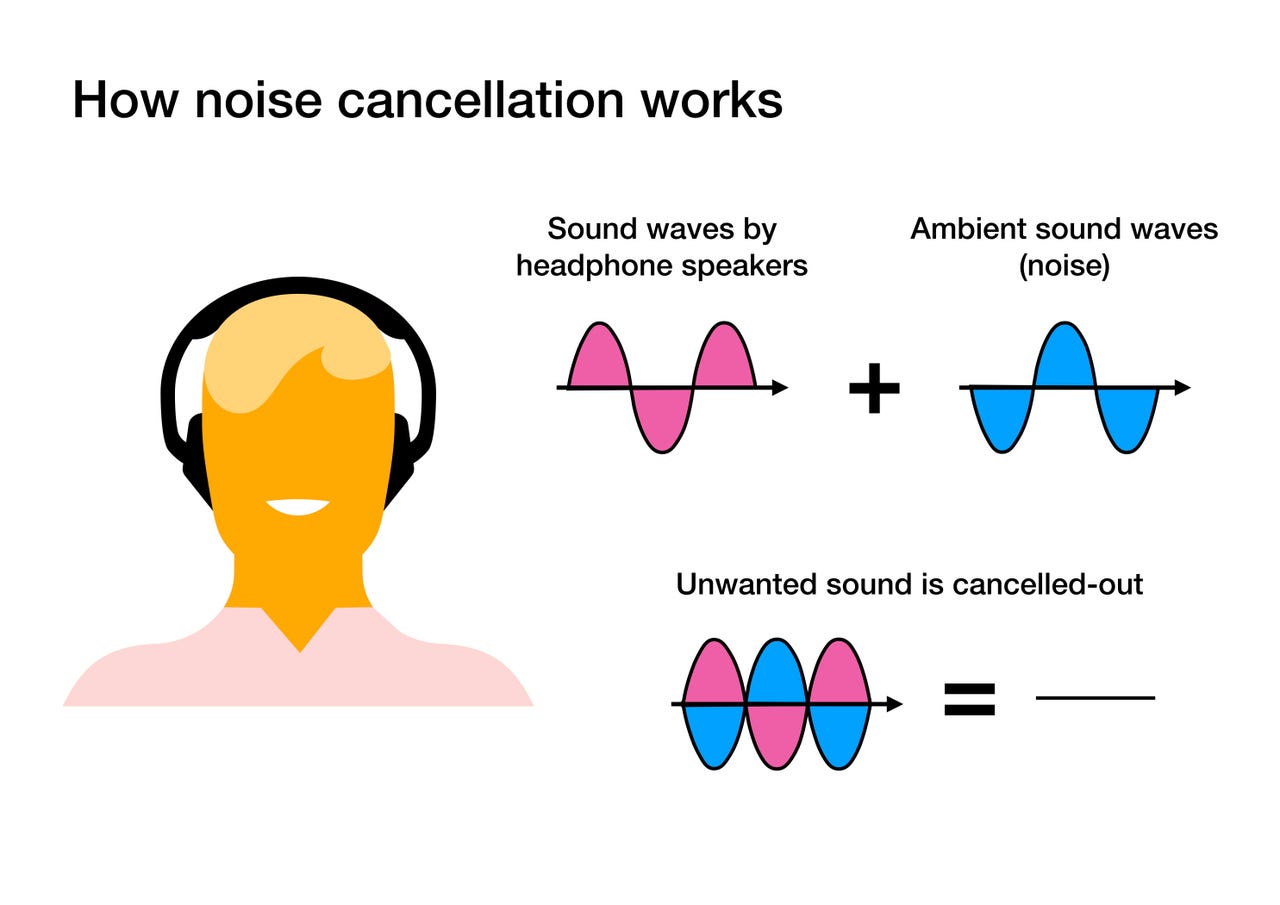
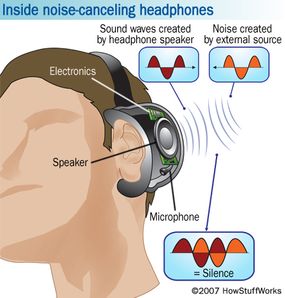
Active noise cancelling uses smart technology. Small microphones inside and outside the ear cups pick up sounds. The headphones then create a sound wave with the exact opposite shape.
This process is called destructive interference. When the two waves meet, they cancel each other out. This reduces the noise you hear.
Steps in active noise cancelling:
- Microphones detect external sounds.
- The internal processor analyzes sound waves.
- Headphones produce opposite sound waves.
- Noise is reduced or cancelled.
Passive noise cancelling depends on materials. Thick padding and tight seals around the ears block sound physically. This method is simple but effective for many noises.
Noise-cancelling technology improves comfort and hearing safety. You can listen at lower volumes because the background noise is less. This helps protect your ears from damage.

Potential Risks To Ear Health
Noise-cancelling headphones have become popular for their ability to block unwanted sounds. Many use them daily for work, travel, or relaxation. Despite their benefits, some worry about their effect on ear health. Understanding the potential risks helps users stay safe. This section covers common concerns like ear pressure, hearing damage, and infections.
Impact On Ear Pressure
Noise-cancelling headphones create a seal around or inside the ear. This can change the ear canal’s air pressure. Some users feel a slight pressure or “plugged” sensation. This happens because the headphones reduce outside noise and cause a vacuum effect. For most, this feeling is mild and temporary.
Still, pressure changes can cause discomfort. People with sensitive ears or ear problems may notice symptoms such as:
- Ear fullness or blockage
- Mild pain or ache
- Temporary hearing changes
Using headphones for long hours may increase these effects. Here is a simple table showing common symptoms and tips to reduce ear pressure:
| Symptom | Tip to Reduce |
|---|---|
| Feeling of ear fullness | Take breaks every 1-2 hours |
| Mild ear pain | Adjust headphone fit or volume |
| Temporary hearing changes | Limit usage time and see a doctor if needed |
Proper fit and not using the headphones at full volume can help ease pressure. Always listen to your body’s signals and pause use if discomfort appears.
Risk Of Hearing Damage
Noise-cancelling headphones allow users to listen at lower volumes. This can protect the ears from loud background noise. Yet, listening at very high volumes still harms hearing.
Common causes of hearing damage include:
- Listening above 85 decibels for long periods
- Using headphones without breaks
- Ignoring early signs like ringing or muffled sound
These risks apply to all headphones, not just noise-cancelling ones. The benefit of noise cancelling is that it reduces the need to raise the volume. This lowers the chance of noise-induced hearing loss.
Follow these safety tips to protect your hearing:
- Keep volume below 60% of the max level
- Limit headphone use to 1 hour at a time
- Take 5-10-minute breaks between sessions
- Use noise-cancelling to block background noise instead of volume
Watching for signs of hearing trouble is key. Early symptoms include:
- Ringing in ears (tinnitus)
- Difficulty hearing soft sounds
- Feeling of ear fullness
Stop use and consult a hearing specialist if these occur.
Ear Infections And Hygiene
Using noise-cancelling headphones can increase the risk of ear infections. This happens because headphones cover or plug the ear canal. Warm, moist environments promote bacterial growth.
Common causes of infections include:
- Wearing headphones for long hours without cleaning
- Sharing headphones with others
- Not drying ears after sweating
Symptoms of ear infections may include:
- Itching or irritation inside the ear
- Redness or swelling
- Pain or discomfort
- Discharge or odor
Good hygiene helps prevent infections. Follow these tips:
- Clean headphones regularly with alcohol wipes
- Avoid sharing headphones
- Remove headphones after sweating and dry your ears
- Use breathable headphone cushions if possible
Keeping ears and headphones clean reduces infection risk. Stop using headphones if pain or irritation develops and seek medical advice.
Benefits Of Noise Cancelling Headphones
Noise-cancelling headphones have become popular for their ability to block outside sounds. Many wonder if they are bad for the ears. Understanding their benefits helps answer this question. These headphones offer more than just silence. They protect hearing, improve sound quality, and help reduce stress. Exploring these advantages shows how they can be good for ear health and overall well-being.
Reducing Exposure To Loud Environments
Noise-cancelling headphones help protect ears by lowering exposure to loud sounds. They use technology to cancel background noise, making it easier to listen at lower volumes. This feature is very useful in noisy places like airplanes, public transport, or busy streets.
Listening at lower volumes helps prevent noise-induced hearing loss. Loud environments can damage sensitive ear cells. Using noise-cancelling headphones reduces the need to raise volume to harmful levels.
- Protects delicate ear structures from loud, constant noise
- Reduces risk of long-term hearing damage
- Allows safer listening in noisy surroundings
- Creates a quieter personal space
| Environment | Noise Level (dB) | Benefit of Noise Cancelling |
|---|---|---|
| Airplane Cabin | 85-95 | Blocks engine noise, reduces the volume needed |
| Busy Street | 70-85 | Minimizes traffic sounds, protects ears |
| Office/Open Workspace | 60-70 | Blocks chatter, helps concentration |
This protection is key for people exposed to noise daily. Noise-cancelling headphones act as a barrier, preventing ear damage and preserving hearing health.
Improved Listening Experience
Noise-cancelling headphones deliver a clearer and richer sound. By removing background noise, they allow users to focus on music, podcasts, or calls without distractions. This leads to a much better listening experience.
Users can enjoy details in audio that often go unnoticed in noisy places. The headphones help balance sound frequencies, making voices and instruments clearer and more natural.
- Clearer sound quality without interference
- Better focus on audio content for learning or entertainment
- Improved voice clarity during phone calls
- Less need to increase volume, protecting ears
Many models include features like adjustable noise cancellation levels. This lets users control how much outside sound they want to block. It creates a personalized audio environment for any situation.
In sum, noise-cancelling headphones enhance how audio is heard. They bring out subtle sounds and reduce distractions, making every listening moment more enjoyable and safe for the ears.
Stress Reduction
Noise-cancelling headphones help lower stress by blocking annoying background sounds. Loud or constant noise can increase tension and cause headaches. Quiet environments created by these headphones bring calm and comfort.
Using noise cancellation helps people relax in noisy places like busy offices, cafes, or public transport. It creates a peaceful bubble that supports mental focus and emotional well-being.
- Reduces noise pollution on the brain
- Helps improve concentration and productivity
- Supports better sleep by blocking disruptive sounds
- Creates a personal space for relaxation
Stress affects both the mind and the body. Noise-cancelling headphones offer a simple way to manage stress caused by sound overload. They can improve mood and help maintain mental health.
Regular use in noisy environments can lead to fewer distractions and a calmer state of mind. This benefit adds to the overall value of noise-cancelling headphones beyond just sound control.
Safe Usage Tips
Noise-cancelling headphones help reduce outside noise and improve sound quality. They can protect your ears from loud sounds around you. Still, using them incorrectly might cause ear problems. Following safe usage tips helps keep your ears healthy. This section shares easy ways to use noise-cancelling headphones without harm.
Volume Levels And Listening Duration
Listening at high volume can hurt your ears. Keep volume at a safe level to protect hearing. Experts say 60% of the maximum volume is safe for most people.
Long listening times can also cause ear fatigue or damage. Take breaks to give your ears rest.
- Keep volume below 60%: Helps reduce risk of hearing loss.
- Limit listening time: Use headphones for no more than 1 hour at a time.
- Take breaks: Pause for 5-10 minutes every hour.
- Use noise cancelling feature: It helps reduce the need for higher volume.
| Volume Level | Safe Listening Time |
|---|---|
| Below 60% | Up to 60 minutes |
| 60%-80% | Up to 15 minutes |
| Above 80% | Less than 5 minutes |
Following these guidelines lowers the chance of ear pain and hearing damage. Use noise-cancelling headphones wisely to enjoy sound safely.
Proper Fit And Hygiene
A good fit keeps headphones comfortable and safe. Poor fit can cause pressure or ear pain. Make sure ear cups or earbuds fit your ears well.
Clean headphones regularly to avoid infections. Earwax and dirt build-up can harm ears and cause discomfort.
- Choose the right size: Use ear tips or cushions that fit snugly but not too tightly.
- Adjust headband: Make sure headphones sit evenly on your head.
- Clean often: Wipe ear cups and ear tips with a soft cloth or alcohol wipes weekly.
- Replace ear tips: Change silicone or foam tips every few months.
Proper fit and hygiene protect ears from irritation and infections. Keep headphones clean and adjust them for comfort.
When To Avoid Using Them
Noise-cancelling headphones are not safe in every situation. Avoid using them when you need to hear important sounds.
Using headphones in unsafe places can increase danger. Also, ears might feel uncomfortable if headphones are used for too long or when sick.
- While driving or cycling, you need full awareness of traffic sounds.
- In emergencies, you must hear alarms or warnings clearly.
- If you have ear pain or infection: Avoid headphones until healed.
- When feeling ear pressure or discomfort: Remove headphones and rest your ears.
Knowing when to stop using headphones helps protect your hearing and safety. Use noise-cancelling headphones wisely for best results.
Expert Opinions And Research Findings
Many people worry about whether noise-cancelling headphones harm their ears. Experts and research help us understand the true effects. This section shares key findings from studies and advice from audiologists. It clears up myths and shows how to use these headphones safely.
Studies On Hearing Health
Several studies have explored the impact of noise-cancelling headphones on hearing. Most research shows these headphones do not damage ears if used properly. They reduce background noise, allowing users to listen at lower volumes. This lowers the risk of hearing loss compared to regular headphones.
Key points from research include:
- Lower volume use: Noise-cancelling technology helps people avoid turning the volume up too high.
- Reduced ear fatigue: Less background noise means ears do not get tired quickly.
- Limited long-term damage: No clear evidence links noise-cancelling headphones to permanent hearing damage.
One study compared noise exposure levels between noise-cancelling and regular headphones:
| Headphone Type | Average Listening Volume (dB) | Risk of Hearing Damage |
|---|---|---|
| Noise Cancelling | 65 | Low |
| Regular | 80 | Higher |
The table shows that users of noise-cancelling headphones tend to listen at safer volumes. Noise-cancelling can protect hearing by encouraging quieter listening habits.

JBL Tune 770NC – Adaptive Noise Cancelling with Smart Ambient Wireless Over-Ear Headphones, Bluetooth 5.3, Up to 70H Battery Life with Speed Charge, Lightweight, Comfortable & Foldable Design
To buy this product, click here.
Recommendations From Audiologists
Audiologists agree that noise-cancelling headphones are safe if used wisely. They suggest several tips to protect your ears:
- Keep volume below 60%: Loud sounds harm hearing over time.
- Limit listening time: Take breaks every hour to rest your ears.
- Choose well-fitting headphones: A good fit improves noise cancellation and comfort.
- Use active noise cancelling: This reduces the need for high volume in noisy places.
Audiologists warn against using any headphones at very high volumes. Listening loudly for long periods causes hearing loss, regardless of headphone type.
Summary of audiologist advice:
| Advice | Reason |
|---|---|
| Use noise-cancelling headphones | Reduces background noise and volume needed |
| Limit volume to 60% or less | Prevents ear damage |
| Take breaks every 60 minutes | Allows ears to recover |
| Ensure proper fit | Improves noise reduction and comfort |

Frequently Asked Questions
Do Noise-Cancelling Headphones Harm Your Ears?
No, noise-cancelling headphones do not harm your ears if used at a safe volume.
Can Long Use Of Noise Cancelling Headphones Cause Ear Pain?
Yes, long use at high volume can cause ear discomfort or pain.
Do Noise-Cancelling Headphones Cause Hearing Loss?
No, they do not cause hearing loss unless the volume is set too high for long periods.
Are Noise Cancelling Headphones Better Than Regular Headphones For Ear Health?
Yes, they reduce outside noise, so you can listen at lower volumes, protecting your ears.
How To Use Noise-Cancelling Headphones Safely For Your Ears?
Use moderate volume, take breaks every hour, and avoid long listening sessions to protect your ears.
Conclusion
Noise-cancelling headphones do not harm your ears by themselves. Listening at high volumes for long periods causes damage. Use moderate volume to protect your hearing. Taking breaks helps your ears rest and recover. Choose comfortable headphones that fit well and block outside noise.
This reduces the need for loud sounds. Enjoy clear sound without risking ear health. Stay aware of your listening habits every day. Your ears will thank you for good hearing later. Safe listening keeps music and quiet moments enjoyable.