How to Clean Battery Corrosion from Electronics : Smart Solution for Battery Corrosion
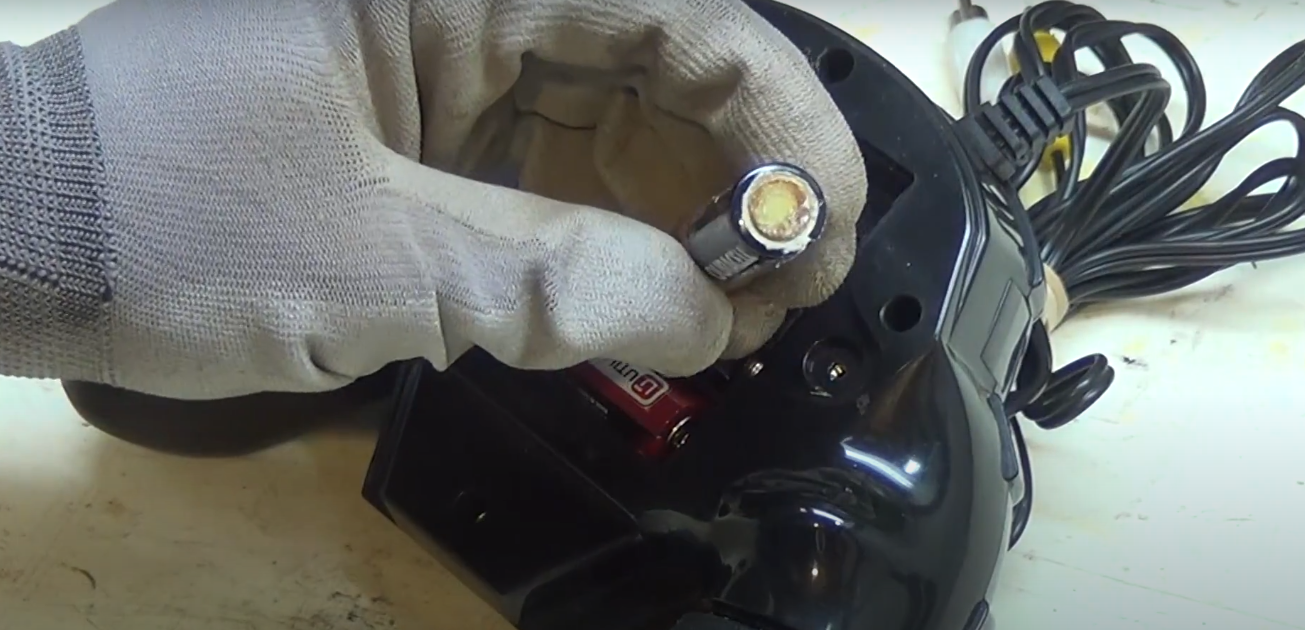
You notice battery corrosion on your favorite gadget. This unwelcome, crusty buildup can damage your electronics. But don’t worry — you can fix it! In this guide, you’ll discover how to clean battery corrosion from electronics the right way using simple tools and smart techniques. Learn how to remove electronics battery corrosion fast, protect your device from permanent damage, and keep it working like new.
Tired of dealing with dead or unresponsive electronics?
You grab your device, press the button—nothing happens. That’s when you notice the white, crusty buildup inside the battery compartment. It’s frustrating, right? But don’t panic. You can fix it quickly and safely. In this guide, you’ll learn how to remove electronics battery corrosion fast using simple tools and easy steps.
We’ll show you how to clean corrosion without damaging your device, restore its performance, and prevent future problems. You’ll take control, protect your gadgets, and save money—all in a few minutes.
Let’s get started and bring your device back to life!
Batteries power our gadgets, but they sometimes leak. This leak causes battery corrosion. Corroded batteries can harm your devices. Knowing the signs of battery corrosion is crucial. It helps in preventing damage. Detecting corrosion early ensures your electronics stay safe and functional.
Battery corrosion is usually visible. It often appears as a powdery substance. This substance can be white, blue, or green. This color change indicates a chemical reaction. It signals that the battery is leaking. Leaked chemicals can damage your device. Regular checks help in identifying corrosion early, allowing you to deal with electronics battery corrosion fast before it causes serious harm.
How To Identify Corroded Batteries
Visual Inspection: Look for any discoloration around the battery compartment.
Unusual Odors: Smell the battery area. A sharp, metallic scent can be a sign.
Device Malfunction: Devices may not turn on or work properly. This can be a result of corrosion.
Common Places To Find Battery Corrosion
Corrosion often appears in devices with removable batteries. Remote controls, toys, and flashlights are common examples. Corrosion might also occur in rarely used items. Checking these gadgets periodically is wise to catch electronics battery corrosion fast and avoid damage.
Effects Of Battery Corrosion On Electronics
Effect
Description
Damage to Contacts
Corrosion can eat away metal contacts. This prevents an electrical connection.
Short Circuits
Leaked chemicals can cause short circuits. This can damage the device.
Device Failure
Corrosion can lead to complete device failure.
Steps To Check For Battery Corrosion
Remove Batteries: Take out the batteries carefully.
Inspect Compartment: Look for any unusual substance or discoloration.
Use a Flashlight: Shine light into hard-to-see areas for better inspection.
Recognizing these signs helps you act quickly. Quick action can save your electronics from damage. Regular checks keep your gadgets in good shape. Stay vigilant and protect your devices by addressing electronics battery corrosion fast before it spreads.
Safety Precautions
Cleaning battery corrosion from electronics requires careful handling. Safety precautions are essential to prevent accidents and ensure a smooth cleaning process. Without proper safety measures, you risk inhaling harmful substances or damaging your device further. If you’re learning how to clean battery corrosion from electronics, it’s important to approach this task with the right gear and environment to protect yourself and your electronic devices. Following the right steps will help you deal with electronics battery corrosion fast, reducing damage and extending the life of your gadget. Below, we explore crucial safety aspects like protective gear and ventilation to help you clean battery corrosion safely.
Protective Gear
Wearing the right protective gear is crucial. It shields you from harmful chemicals and prevents skin irritation. Here are some items you need:
Gloves: Use rubber gloves to avoid skin contact with corrosive substances.
Safety goggles: Protect your eyes from splashes and fumes.
Apron: Wear a protective apron to prevent spills on clothing.
Ensuring you have the right gear is not just about protection. It also helps you work efficiently. Here’s a quick reference table for protective gear:
Item
Purpose
Gloves
Protects hands from chemicals
Safety goggles
Protects eyes from splashes
Apron
Protects clothing
Always check the condition of your gear before starting. A damaged gear can reduce protection. Keep spare gear in case of wear and tear. Proper protective gear is your first line of defense.
Ventilation
Ventilation is vital to disperse harmful fumes. Poor air circulation can lead to inhalation risks. Follow these tips to ensure proper ventilation:
Open windows: Ensure windows are open to allow fresh air.
Use fans: Place fans to direct fumes away from your breathing zone.
Avoid closed spaces: Never work in a tightly closed area.
A well-ventilated space reduces health risks. It helps you focus on cleaning without worrying about inhaling toxic fumes. Here’s a simple setup for effective ventilation:
Action
Benefit
Open windows
Allows fresh air circulation
Use fans
Directs fumes away
Avoid closed spaces
Prevents fume buildup
Remember, good ventilation doesn’t just protect you. It also ensures a more comfortable working environment. Prioritize air flow for safe and effective cleaning.
Tools And Materials Needed
Cleaning battery corrosion from electronics can seem daunting, but with the right tools and materials, it becomes a manageable task. Corrosion occurs when batteries leak, leaving a crusty, white residue that can damage your devices. To clean electronics battery corrosion fast and restore your gadgets to their best condition, having the right cleaning solutions and tools is essential. If you’re wondering how to clean battery corrosion from electronics safely and effectively, this guide will walk you through everything you need. Let’s explore battery corrosion removal tips you’ll need to tackle this common issue with confidence.
Cleaning Solutions
To safely remove battery corrosion, choose a cleaning solution that neutralizes the acidic residue. Here are a few options you can consider:
Baking Soda Solution: A mixture of baking soda and water can neutralize battery acid. Mix a tablespoon of baking soda with a cup of water.
Vinegar: White vinegar is another excellent choice. It reacts with the corrosion to clean it effectively.
Isopropyl Alcohol: Use 70% or higher concentration to clean and disinfect the area.
Here’s a quick reference table for preparing these solutions:
Solution
Ingredients
Preparation
Baking Soda
1 tbsp Baking Soda, 1 cup Water
Mix well until dissolved
Vinegar
White Vinegar
Use directly
Isopropyl Alcohol
Isopropyl Alcohol (70%+)
Use directly
Each solution has its benefits. Baking soda is gentle and neutralizes acids. Vinegar is acidic, effectively breaking down corrosion. Alcohol cleans and disinfects. Choose based on what you have at home and the severity of the corrosion to effectively deal with Electronics Battery Corrosion Fast and protect your devices.
Cleaning Tools
Equally important to solutions are the tools you use. These help in safely applying the solutions and removing corrosion:
Soft Cloth: Use a microfiber cloth to apply the cleaning solution. It’s gentle and won’t scratch surfaces.
Cotton Swabs: Perfect for reaching tight spaces. They help in precisely applying the solution.
Toothbrush: A soft-bristled toothbrush can scrub away stubborn corrosion.
Gloves: Always wear gloves to protect your hands from chemicals.
Eye Protection: Safety glasses can protect your eyes from splashes.
Here’s a summary of the tools and their use:
Tool
Use
Soft Cloth
Apply the solution gently
Cotton Swabs
Reach small areas
Toothbrush
Scrub corrosion
Gloves
Protect hands
Eye Protection
Protect eyes
Using the right tools ensures you can clean effectively without damaging your electronics. Always handle your devices with care during cleaning to prevent further damage. These precautions help you deal with Electronics Battery Corrosion Fast while keeping your gadgets safe.
Step-by-Step Cleaning Process
Battery corrosion can damage your beloved electronics. Knowing how to clean it properly is essential. Here’s a simple step-by-step cleaning process to help you restore your devices. Follow these steps to ensure a smooth and safe cleaning journey, and learn how to deal with Electronics Battery Corrosion Fast for the best results.
Powering Off The Device
Before cleaning, always turn off the device. This is crucial to prevent any electric shock or damage. Never attempt to clean a device while it’s powered on. Below are some key reasons for powering off:
Safety: Reduces the risk of electric shock.
Prevention: Protects internal components from short circuits.
Conservation: Stops the battery from draining further.
To power off:
Find the power button or switch.
Press and hold until the device shuts down.
Ensure the screen is completely dark and inactive.
Once powered off, you’re ready for the next step. Proceed with caution, ensuring the device stays off throughout the process.
Removing Batteries
After powering off, remove the batteries. This prevents further corrosion and damage. Follow these simple steps:
Inspection: Enables you to check battery terminals.
Be careful not to touch any leaked acid. Use gloves if necessary. Ensure all batteries are removed before proceeding.
Applying Cleaning Solution
With batteries removed, apply a cleaning solution. This helps dissolve the corrosion. You can use household items like:
Solution
Purpose
Baking Soda Paste
Neutralizes acid effectively
Vinegar
Dissolves corrosion quickly
Lemon Juice
Acts as a natural cleaner
Steps to apply the cleaning solution:
Mix baking soda with water to form a paste.
Apply paste using a cotton swab or toothbrush.
Allow it to sit for a few minutes to work on the corrosion.
Ensure thorough coverage for best results. Move to scrubbing after application.
Scrubbing The Corrosion
Once the solution sits, begin scrubbing. This removes stubborn corrosion. Use the following tools:
Toothbrush: Soft bristles, effective scrubbing.
Cotton Swabs: Precise cleaning in small areas.
Steps to scrub:
Gently scrub the corroded areas.
Focus on battery terminals and surrounding spaces.
Repeat until corrosion is visibly reduced.
Importance of scrubbing:
Removal: Clears corrosion completely.
Maintenance: Ensures device longevity.
Be patient and gentle. Avoid damaging delicate parts.
Wiping And Drying
After scrubbing, wipe and dry the device. This prevents any leftover solution from causing damage. Follow these steps:
Use a clean cloth to wipe down all areas.
Ensure no residue remains.
Dry the device thoroughly.
Reasons to wipe and dry:
Prevention: Stops moisture from affecting electronics.
Cleanliness: Leaves device spotless.
Safety: Ensures safe reassembly.
Once dry, check for any missed spots. Repeat if necessary. Ensure complete drying before reinserting batteries.
Disposal Of Corroded Batteries
Battery corrosion can damage your electronic devices. It’s essential to clean it properly to extend the life of your gadgets. But cleaning isn’t the only step. You also need to get rid of the corroded batteries safely. Improper disposal can harm the environment and even cause accidents. So, understanding the right disposal methods is crucial to managing Electronics Battery Corrosion Fast and keeping both your devices and surroundings safe.
How To Identify Corroded Batteries
Corroded batteries often have a white or bluish powder on them. This is a sign of leakage. It’s important to handle them carefully. Wear gloves to avoid contact with your skin. Corroded batteries can be hazardous.
Why Proper Disposal Matters
Throwing corroded batteries in regular trash is a bad idea. They contain harmful chemicals. These can leak into the soil and water. Proper disposal helps keep the environment clean. It also prevents potential health risks.
Safe Disposal Methods
Recycling Centers: Many cities have recycling facilities. They accept batteries for safe disposal.
Retail Drop-Off: Some stores have drop-off bins for batteries. Check with your local electronics store.
Municipal Waste Programs: Some areas offer special waste collection days. You can dispose of batteries during these events.
Tips For Storing Batteries
Store batteries in a cool, dry place. Keep them in their original packaging. This helps prevent corrosion. Check the expiration dates regularly. Replace old batteries to avoid leakage.
FAQs On Battery Disposal
Question
Answer
Can I throw batteries in the trash?
No, it’s unsafe and harmful to the environment.
Where can I recycle batteries?
Check local recycling centers or electronic stores.
Are there any fees for battery disposal?
Some places may charge a small fee.
Understanding how to clean and dispose of corroded batteries properly is vital. It ensures safety and protects the environment. Follow these guidelines to manage battery disposal effectively.
Preventing Future Corrosion
Battery corrosion can damage electronics and reduce their lifespan. Cleaning corrosion is crucial, but preventing it is even more important. Taking steps to prevent future corrosion will help maintain your devices in excellent condition. Simple habits can keep your electronics safe and functional for years, especially if you act early and address Electronics Battery Corrosion Fast.
Storage Tips
Proper storage is essential to prevent battery corrosion in electronics. Follow these tips to keep your devices safe:
Keep batteries dry: Moisture is a leading cause of corrosion. Store electronics in a dry place.
Avoid temperature extremes: High temperatures can increase the risk of corrosion. Store devices in cool areas.
Remove batteries: If not used for a long time, remove batteries from devices. This prevents leakage and corrosion.
Use airtight containers: These containers protect from humidity. Seal devices inside when not in use.
Consider using the table below for quick storage tips:
Storage Environment
Action
Dry
Store electronics in dry places
Cool
Avoid heat exposure
Airtight
Use sealed containers
Regular Maintenance
Regular maintenance extends the life of your electronics by preventing corrosion. Establish a routine to check your devices:
Inspect batteries: Check for signs of leakage or wear. Replace old batteries promptly.
Clean contacts: Use a dry cloth to wipe battery contacts. This removes dust and residue.
Test functionality: Ensure devices work properly. Regular testing helps detect early signs of corrosion.
Monitor usage: Track battery usage to avoid overdraining. Overdrained batteries can corrode faster.
Simple steps can make a big difference. Regular checks ensure your electronics stay corrosion-free. A little effort goes a long way in maintaining your devices.
Frequently Asked Questions
How Do You Clean Electronics After Battery Corrosion?
To clean electronics after battery corrosion, first remove the corroded battery carefully. Use a cotton swab dipped in white vinegar or lemon juice to gently wipe the affected area. Dry the area with a clean cloth. Ensure no residue remains before inserting new batteries.
Regular maintenance prevents future corrosion.
How Do You Remove Corrosion From Electronics?
To clean Electronics Battery Corrosion Fast, first, power off and disconnect the device. Gently clean with a cotton swab dipped in isopropyl alcohol. Dry thoroughly before reassembling. Always handle electronics with care to prevent further damage while addressing Electronics Battery Corrosion Fast effectively.
Is Vinegar Or Alcohol Better For Battery Corrosion?
Vinegar is better for battery corrosion. Its acidity dissolves corrosion effectively. Alcohol cleans but lacks the corrosion-fighting power of vinegar. Use vinegar for best results, then rinse with water and dry thoroughly. Always ensure safety by wearing gloves and working in a well-ventilated area when handling corroded batteries. This method helps you tackle Electronics Battery Corrosion Fast while protecting your health and devices.
Does Battery Corrosion Ruin Electronics?
Yes, battery corrosion can damage electronics. It disrupts connections, causing devices to malfunction or stop working. Clean the corrosion promptly to prevent further harm. Use a mixture of baking soda and water for cleaning. Regular maintenance and checking batteries can help avoid corrosion-related issues. Always handle electronics with care, especially if you want to deal with Electronics Battery Corrosion Fast and keep your devices running smoothly.
Conclusion
Cleaning battery corrosion is crucial for electronic health because it prevents long-term damage. To keep your devices safe, learn how to remove electronics battery corrosion fast by following the steps in this guide. Always wear protective gloves and work in a ventilated area while cleaning. Regular checks help you spot early signs of corrosion and avoid issues. Dispose of corroded batteries properly to ensure safety and environmental care.
This ensures safety for you and the environment. Maintaining Clean Electronics Battery Corrosion Fast ensures better performance. You can enjoy longer device life. Keep this guide handy for future reference. Share with friends who might need help. Happy cleaning and stay safe!