Are you tired of using a mouse that doesn’t quite hit the mark during your gaming sessions? Finding the perfect gaming mouse can feel like searching for a needle in a haystack, but we’ll show you how to Choose a Good Gaming Mouse that fits your needs perfectly.
But imagine having a mouse that responds flawlessly to your every move, enhancing your gameplay and giving you that competitive edge. Choosing the right gaming mouse is crucial for your success and enjoyment in the virtual world. You deserve a tool that complements your skills and elevates your gaming experience.
Stay with us as we guide you through the key features and considerations to help you choose the best gaming mouse tailored just for you. Dive in and discover how the right choice can transform your gaming performance!
Choosing a gaming mouse is crucial for any serious gamer. A good gaming mouse can make a big difference in your gameplay. It offers precision, speed, and comfort, enhancing your overall experience. To Choose a Good Gaming Mouse, understanding its importance helps you make informed choices and boosts your performance. Without the right one, you may find yourself struggling with aim and response times.
Importance Of Precision
Precision is key in gaming. A gaming mouse offers higher DPI (dots per inch) settings. This means it can track movements more accurately. A precise mouse lets you hit targets with ease. This is especially important in fast-paced games.
Enhanced Speed And Response Time
Speed and response time are crucial in competitive gaming. Gaming mice come with customizable buttons. These buttons let you execute actions faster than a regular mouse. Faster response times can be the difference between winning and losing.
Comfort And Ergonomics
Comfort matters during long gaming sessions. Gaming mice are designed with ergonomics in mind. They fit comfortably in your hand, reducing strain. This helps you play longer without discomfort.
Durability And Build Quality
Gaming mice are built to last. They are made from high-quality materials. This ensures they can withstand intense gaming. Investing in a durable mouse saves you money in the long run.
Customizability And Personalization
Customization options let you tailor your mouse to your needs. From adjustable weights to programmable buttons, you can set up the mouse how you like. This personalization enhances your gaming style.
Features Comparison Table
Feature
Gaming Mouse
Regular Mouse
Precision
High DPI settings
Low DPI settings
Response Time
Fast and customizable
Standard speed
Comfort
Ergonomic design
Standard design
Durability
High-quality materials
Basic materials
Customizability
Programmable buttons
Limited options
Key Features To Consider
Choosing a Good Gaming Mouse can greatly enhance your gaming experience. It’s not just about flashy designs or colors. The right mouse can improve your accuracy, comfort, and overall performance. To make an informed choice, focus on key features. These features will determine how well the mouse meets your gaming needs.
DPI and Sensitivity
DPI stands for Dots Per Inch. It indicates how sensitive the mouse is. A higher DPI means the cursor moves further with less hand movement. This is crucial for fast-paced games. You might need a mouse with adjustable DPI settings.
Low DPI: Good for precision tasks like sniping.
High DPI: Suitable for fast movements and quick reactions.
Adjustable DPI: Allows you to switch between low and high DPI.
Here’s a simple table to help you understand:
DPI Range
Best For
400-800
Precision and control
1000-1600
Balanced gameplay
2000+
Fast-action games
Choose a DPI setting that matches your play style. If you play different types of games, look for a mouse with a wide DPI range.
Polling Rate
The polling rate is how often your mouse reports its position to the computer. It’s measured in Hertz (Hz). A higher polling rate means more frequent updates.
Why does this matter? It affects how smooth and responsive the mouse feels. For gamers, a higher polling rate can mean the difference between winning and losing. Here’s a breakdown:
125 Hz: Reports every 8 milliseconds. May feel sluggish for gaming.
500 Hz: Reports every 2 milliseconds. Good for most gamers.
1000 Hz: Reports every 1 millisecond. Offers the fastest response.
Most gaming mice offer a polling rate of at least 500 Hz. Consider your computer’s performance as well. A high polling rate requires more processing power.
Ergonomics
Ergonomics refers to how comfortable the mouse is to use. A good gaming mouse should fit your hand well. This can prevent strain during long gaming sessions.
Consider these factors:
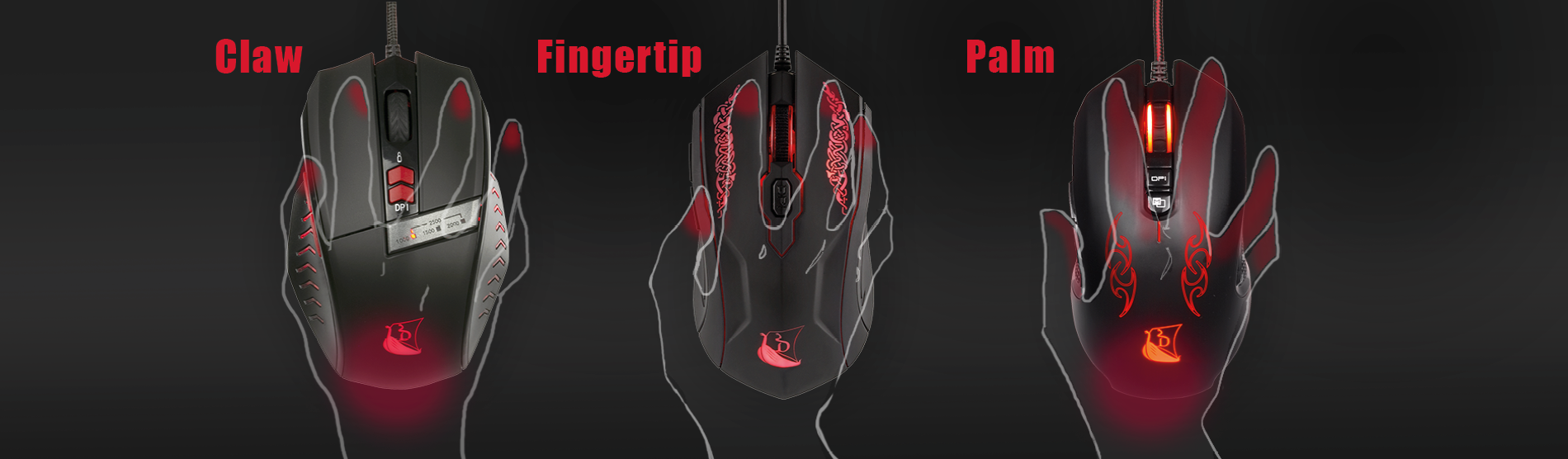
Grip Style: Are you a palm, claw, or fingertip gripper? Each style requires a different mouse shape.
Hand Size: Choose a mouse that matches your hand size for maximum comfort.
Button Placement: Ensure buttons are easy to reach and press.
Some gaming mice also have customizable shapes. This means you can adjust parts of the mouse to better fit your hand.
Weight And Balance
Weight affects how the mouse feels and moves. Some gamers prefer a lightweight mouse for quick movements. Others like a heavier mouse for more control.
Things to consider:
Lightweight (50-70g): Ideal for fast-paced games.
Medium weight (70-100g): Balanced for various games.
Heavy (100g+): Good for precise control.
Balance is also important. Some mice allow you to adjust the weight distribution. This can help you find the perfect balance for your play style.
Ultimately, the right weight and balance depend on personal preference. Consider testing different weights to see what feels best for you.
Types Of Gaming Mice
Choosing a good gaming mouse can be a daunting task. With so many options available, it’s essential to understand the different types of gaming mice. Each type is designed for specific gaming needs. Whether you love fast-paced shooters or strategic RPGs, there’s a mouse for you. Let’s explore the various types of gaming mice to help you make an informed decision.
Wired Vs Wireless
One of the first decisions in selecting a gaming mouse is choosing between wired and wireless. Both have their strengths and weaknesses.
Wired mice provide a stable connection. No lag. No interruptions. They’re often preferred by professional gamers. Why? Consistent performance. Plus, there’s no need to worry about battery life.
Stable connection
No battery required
Lower cost
Wireless mice offer freedom. No cables. More movement. Modern wireless technology has reduced latency issues significantly. They are suitable for gamers who value a clean desk setup.
Greater mobility
Less clutter
Rechargeable options available
Here’s a quick comparison:
Feature
Wired
Wireless
Connection
Stable
Improved, but can vary
Mobility
Limited by cable
Full freedom
Cost
Generally cheaper
Can be expensive
Fps Mice
FPS (First-Person Shooter) mice are tailored for precision and speed. Gamers who play titles like Call of Duty or Counter-Strike need a mouse that delivers accurate aim.
Key features of FPS mice include:
High DPI (Dots Per Inch): Ensures swift and precise movements.
Lightweight design: Reduces fatigue during extended gaming sessions.
Sniper button: Allows for quick DPI adjustments.
These mice often have a simple design with minimal buttons. This simplicity is ideal for quick reflexes and fast response times. The focus is on performance, not extra features.
Mmo Mice
MMO (Massively Multiplayer Online) mice are perfect for complex games like World of Warcraft. These games often require numerous commands and macros.
MMO mice are equipped with:
Multiple programmable buttons: Customizable for different commands.
Ergonomic design: Comfortable for long gaming periods.
Adjustable weight: Tailor the feel of the mouse.
These mice can have up to 20 buttons. This allows players to execute complex strategies seamlessly. It’s all about control and customization.
Moba Mice
MOBA (Multiplayer Online Battle Arena) mice are designed for games like League of Legends and Dota 2. These games require quick strategy changes and team coordination.
MOBA mice offer:
Moderate button count: Typically 6-8 buttons for ease of access.
Comfortable grip: Important for extended play.
Durable switches: Built to withstand intense clicking.
These mice balance between the minimalism of FPS mice and the complexity of MMO mice. They are ideal for players who need quick access to a few key abilities.
Customization And Software
Choosing a good gaming mouse involves more than just picking one with a cool design. A key aspect is Customization and Software. This ensures the mouse fits your gaming style and enhances your performance. Customization options like programmable buttons, lighting, and software profiles can make a big difference. Understanding these features will help you make the best choice for your needs.
Programmable Buttons
Programmable buttons offer flexibility in gameplay. They allow you to assign specific functions or actions to each button. This can include anything from reloading a weapon to using a special skill. A mouse with multiple programmable buttons can give you an edge in fast-paced games.
Number of Buttons: More buttons provide more options. A typical gaming mouse may have 5 to 12 buttons.
Ease of Programming: Look for mice with easy-to-use software for programming buttons.
Consider the placement of these buttons. They should be easily accessible without straining your fingers. A well-placed button layout enhances comfort and efficiency.
Feature
Benefit
Customizable Buttons
Enhanced gameplay control
Software Integration
Easy setup and modification
Choose a mouse that suits your grip style. Some buttons may be uncomfortable if not placed well for your hand size.
Lighting Options
Lighting options are not just for aesthetics. They can also improve your gaming experience. Many gaming mice come with RGB lighting, allowing you to customize colors and effects.
RGB Lighting: Provides a wide range of colors and effects. You can personalize your mouse to match your gaming setup.
Customizable Zones: Some mice have multiple lighting zones. You can set different colors for each zone.
Lighting can also serve practical purposes. For example, some mice allow you to set specific colors for different DPI levels. This gives a visual cue to your current settings.
Lighting Feature
Advantage
Custom Colors
Personalized aesthetic
DPI Indication
Quick visual reference
Check if the lighting can be adjusted through software. This adds another layer of customization to your gaming experience.
Profiles And Macros
Profiles and macros are valuable for gamers who play different types of games. Profiles let you save different button configurations for each game. Macros allow you to automate complex actions with a single button press.
Multiple Profiles: Save settings for different games or tasks. Easily switch between them using dedicated buttons or software.
Macros: Record a series of actions and play them back with one click.
This feature is especially useful in strategy or role-playing games. It allows quick execution of multiple commands, saving time and effort.
Feature
Benefit
Profile Switching
Seamless transition between games
Macro Recording
Automated complex actions
Ensure the mouse software supports easy profile management. This ensures you can effortlessly toggle between different settings.
Budget Considerations
Choosing a good gaming mouse is an essential step for any gamer. It can greatly enhance your gaming experience. While many factors influence this choice, budget considerations play a crucial role. Understanding how much you can spend and what you get for your money can help you make an informed decision. Let’s delve into these budget considerations.
Price Range Analysis
When selecting a gaming mouse, it’s important to understand the price range. Gaming mice come in various price brackets. Each range offers different features. Here’s a breakdown of what to expect:
Low-end ($10 – $30): Basic functionality. You get simple designs and limited features. Suitable for casual gamers.
Mid-range ($30 – $70): Better ergonomics and additional features. Often includes adjustable DPI settings and customizable buttons.
High-end ($70 and above): Advanced features. These include high precision sensors, RGB lighting, and programmable buttons. Ideal for professional gamers.
The table below summarizes the key differences:
Price Range
Features
Target Audience
$10 – $30
Basic, Limited Features
Casual Gamers
$30 – $70
Good Ergonomics, Extra Features
Enthusiast Gamers
$70 and above
Advanced Features, High Precision
Professional Gamers
Identifying your needs helps you choose the right price range. Consider what features are essential for your gaming style.
Value For Money
Getting value for money is crucial when purchasing a gaming mouse. You want to ensure that every dollar spent adds to your gaming experience. Here are some tips to maximize value:
Feature Comparison: Compare features across different models. Look for features like DPI adjustments, programmable buttons, and RGB lighting.
Read Reviews: Reviews provide insights into real user experiences. They highlight the strengths and weaknesses of each model.
Brand Reliability: Well-known brands often offer better build quality. They also provide good customer support.
Warranty and Support: A good warranty can save costs in the long run. Check the warranty terms and available support.
Balancing price with features helps you find the best deal. A higher-priced mouse with essential features can provide better value than a cheaper, feature-limited option.
Remember, the right gaming mouse enhances your enjoyment. It improves your performance. So, take your time to make a wise investment.
Brand Recommendations
Choosing a gaming mouse can be overwhelming. The market offers countless options. Finding a good brand is key. You need reliability, performance, and comfort. Brand reputation ensures quality products. It’s crucial to select a brand that meets your needs. Below, discover some reputable gaming mouse brands.
Razer
Razer is a leader in gaming peripherals. Known for high-quality products. Offers precision and speed. Popular among professional gamers. Razer mice feature customizable buttons. They have RGB lighting. Known for ergonomic designs.
Logitech
Logitech offers reliable gaming mice. Known for innovation. Provides wireless options. Logitech mice deliver accuracy. Often used in esports. They have a durable build quality. Many models include advanced sensors.
Steelseries
SteelSeries focuses on performance. Preferred by competitive gamers. Offers customizable settings. Known for sleek designs. SteelSeries mice have mechanical switches. Provides smooth tracking. Offers various price ranges.
Corsair
Corsair is popular in gaming communities. Known for a robust build. Offers high DPI ranges. Corsair mice are comfortable. Many models have programmable buttons. Known for fast response times. They offer RGB lighting options.
Hyperx
HyperX is growing in popularity. Known for affordability. Offers lightweight designs. HyperX mice are responsive. Ideal for fast-paced games. Provides good grip options. Known for reliable performance.
High DPI ranges, programmable buttons, fast response
HyperX
Affordable, lightweight, and good grip options
User Reviews And Feedback
Choosing a Good Gaming Mouse can make a big difference. User reviews and feedback are vital in this decision. They offer real-world insights and experiences. Reviews can highlight both strengths and weaknesses. This helps gamers find the right fit for their needs.
Read The Experience
Many gamers share their personal experiences online. These stories can be eye-opening. They provide details about the mouse’s performance in action. Does the mouse glide smoothly? Is the response time fast? These are common questions answered in reviews. Reviews can also reveal any recurring issues. Knowing these can save you from future troubles.
Look For Consistency
Not all reviews are created equal. Some may be biased or uninformed. Seek consistent feedback across multiple reviews. If many people mention the same feature, it is likely accurate. Consistent praise or complaints paint a clearer picture. This helps in making an informed choice. Consistent reviews also build trust in the product’s quality.
Analyze The Ratings
Ratings offer a quick snapshot of a product’s reputation. A high rating usually means satisfaction. But don’t rely solely on numbers. Read the context behind the stars. A product with a few reviews can have a high rating but lack depth. On the other hand, a product with many reviews and a moderate rating may provide more reliable information.
Check For Updates
Gaming mouse technology evolves rapidly. Look for recent reviews. They reflect the current state of the product. Older reviews may not account for updates or improvements. Newer reviews can give insights into any changes. This ensures you have the most accurate information.
Compare Competing Products
Sometimes, reviews mention other products. Use these comparisons to your advantage. They can highlight differences in features or performance. Such comparisons can help identify the best value for your money. They also provide a broader understanding of what’s available in the market.
Review Aspect
Importance
Performance
High
Durability
Medium
Price
High
Design
Medium
In summary, user reviews and feedback are essential tools. They guide you through the vast options available. Understanding these insights leads to a smarter purchase.
Testing And Trying Out
Choosing the right gaming mouse can be daunting. Testing and trying out different options is crucial. A gaming mouse is a personal tool. It should fit your hand and play style. Before buying, ensure it feels right. Testing helps you discover what suits your needs best.
Mouse Sensitivity And Precision
Mouse sensitivity is vital for gaming. Test the DPI settings of the mouse. A higher DPI means more sensitivity. It allows faster movements. But sometimes lower DPI offers better control. Experiment with both settings. See which one aligns with your play style.
Ergonomic Design And Comfort
Comfort is key during long gaming sessions. Try different mouse shapes. Claw, palm, or fingertip grips each feel different. Ensure the mouse does not strain your hand. A comfortable mouse enhances performance. Look for one with an ergonomic design.
Button Layout And Customization
Button placement matters. Test the button layout of various mice. Ensure easy access during gameplay. Check for customizable buttons. These offer extra functionality. Customize them to suit your game commands. Testing helps find the perfect layout.
Weight And Balance
The weight of a mouse affects control. Some gamers prefer a light mouse. Others like heavier options. Test different weights. Some mice come with adjustable weights. This feature allows you to find the perfect balance. Try both light and heavy options.
Build Quality And Durability
A gaming mouse should withstand intense use. Test the build quality. Look for durable materials. High-quality mice often last longer. Check the finish. It should be resistant to wear. A sturdy mouse is a good investment.
Feature
Importance
Sensitivity
Adjustable DPI for precision
Ergonomics
Comfort for long sessions
Buttons
Customizable for gameplay
Weight
Adjustable for balance
Durability
Quality materials
Testing a gaming mouse is about personal preference. It’s about finding what feels right for you. Experiment with different options. This ensures a good fit for your gaming needs.
BENGOO Gaming Mouse Wired, Ergonomic Gamer Laptop PC Optical Computer Mice with RGB Backlit, 4 Adjustable DPI Up to 3600, 6 Programmable Buttons for Windows 7/8/10/XP Vista Linux -Black
Frequently Asked Questions
How To Choose The Best Mouse For Gaming?
Choose a mouse with a comfortable grip and a responsive sensor. Consider DPI settings for precision. Look for customizable buttons and RGB lighting. Check compatibility with your system. Read reviews for reliability and performance insights.
What Determines A Good Gaming Mouse?
A good gaming mouse features high DPI settings for precision. It should have customizable buttons and an ergonomic design for comfort. Look for durable build quality and reliable sensor performance. Low latency and compatibility with your gaming setup enhance its effectiveness.
How Do I Select The Right Mouse?
Choose a mouse based on your usage needs. Consider comfort, DPI sensitivity, connectivity options, and additional features. Test grip and button placement. Prioritize wired or wireless based on convenience. For gaming, seek high DPI and programmable buttons. Read reviews for reliability and performance insights.
Is 1000 Hz good For A Gaming Mouse?
Yes, 1000Hz is excellent for a gaming mouse. It offers fast response times and enhances gameplay precision. Gamers experience smoother tracking and reduced latency. A higher polling rate improves overall gaming performance, making it a preferred choice for competitive players.
Conclusion
Choosing the right gaming mouse can enhance your gaming experience. To Choose a Good Gaming Mouse, remember to consider the mouse’s comfort and size. Check if the sensor meets your gaming needs. Pay attention to the button layout and durability. Look for a mouse with adjustable DPI settings.
Consider your budget, but focus on quality. A good mouse should offer smooth performance. Test different models if possible. Read reviews from other gamers for insights. Ultimately, the best mouse for you is one that fits your style and needs. Happy gaming!