What Are the Best Gaming Keyboard Switches in 2026?
Choosing the right keyboard switch can completely transform your gaming experience. With The Best Gaming Keyboard Switches, every key responds instantly and feels perfectly tactile under your fingers, giving you the precision and speed you need to dominate every match.
But with so many options out there, how do you know which switch is best for you? This guide will help you find the perfect keyboard switch that matches your gaming style. By the end, you’ll be ready to pick a switch that makes every keystroke count and gives you an edge over your opponents.
Keep reading to discover which switches can boost your gameplay and comfort!
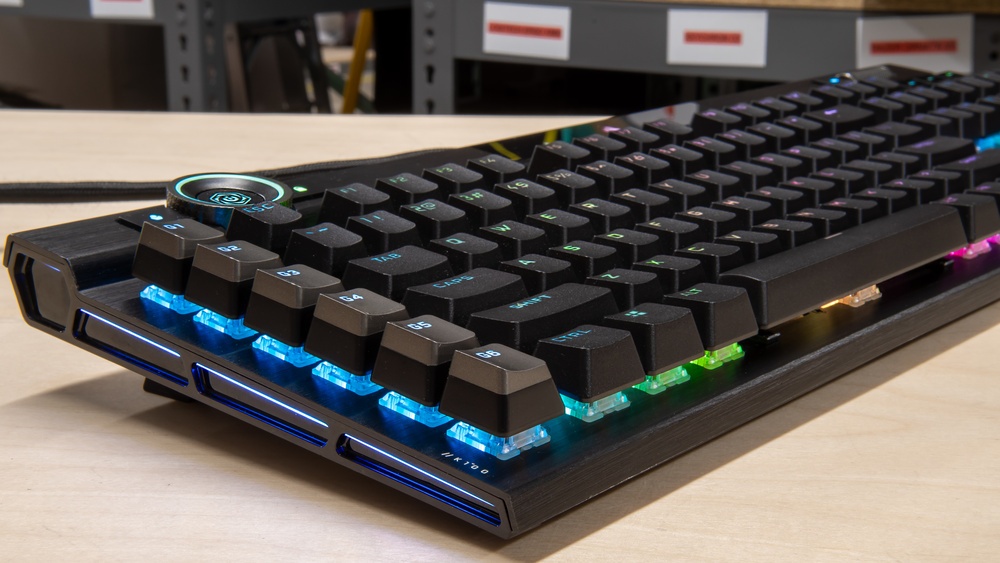
Choosing the best keyboard switches affects gaming comfort and response time. Mechanical and membrane switches are the two main types used in gaming keyboards. Mechanical switches use individual springs and physical mechanisms under each key. Membrane switches use pressure pads beneath a flat surface. Both types have unique traits that affect feel, durability, and performance during gaming.
Key Differences
Mechanical and membrane switches differ in design, feedback, and lifespan. Mechanical switches have separate moving parts, making them more precise and tactile. Membrane switches rely on a single rubber or silicone layer that registers key presses.
Build: Mechanical switches have springs and sliders; membrane switches use pressure pads.
Feedback: Mechanical keys give clear tactile or clicky feedback; membrane keys feel softer and quieter.
Durability: Mechanical switches last around 50 million keystrokes; membrane switches last 5-10 million.
Typing Noise: Mechanical switches are louder; membrane switches are quieter.
Price: Mechanical keyboards cost more; membrane keyboards are budget-friendly.
Feature
Mechanical Switches
Membrane Switches
Mechanism
Individual springs and stems
Pressure pads under a membrane
Feedback
Tactile or clicky
Soft and mushy
Durability
~50 million keystrokes
5-10 million keystrokes
Noise Level
Louder, noticeable clicks
Quieter, less audible
Cost
Higher price
Lower price
Impact On Gaming Performance
Mechanical switches improve gaming by offering faster response and better accuracy. Their tactile feedback lets players know when a key is pressed. This reduces errors and improves timing in fast games. Mechanical switches also support N-key rollover, which registers multiple key presses simultaneously.
Membrane switches feel softer but may delay input slightly. This delay can affect fast-paced gaming where every millisecond counts. Membrane keyboards often have limited rollover, causing missed or dropped key presses during intense gameplay.
Mechanical Switch Advantages:
Quick and precise key actuation
Better feedback for confident key presses
High durability for long gaming sessions
Supports multiple simultaneous key presses
Membrane Switch Drawbacks:
Softer feedback may cause accidental presses
Slower response times
Limited rollover capability
Less durable under heavy use
Gaming Factor
Mechanical Switches
Membrane Switches
Response Time
Fast, precise
Slower, less precise
Key Feedback
Clear, tactile, or clicky
Soft, mushy
Multi-Key Input
Full N-key rollover
Limited rollover
Durability
High, lasts for years
Lower, wears faster
Popular Switch Types
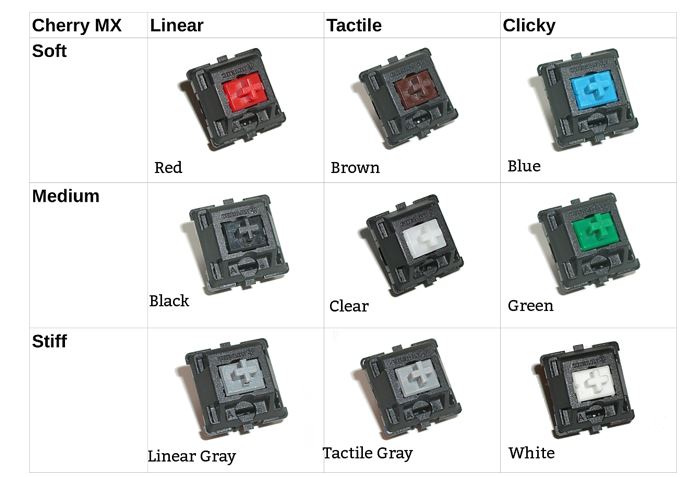
Choosing the right keyboard switches is vital for gaming performance and comfort. Different switch types offer unique feedback and feel, affecting your speed and accuracy. Understanding popular switch types helps pick the best one for your gaming style. The three main types are linear, tactile, and clicky switches. Each has distinct characteristics that suit different preferences and games.
Linear Switches
Linear switches provide a smooth, consistent keystroke without any tactile bump or audible click. They move straight down with little resistance, making key presses feel fluid and fast. This makes them popular among gamers who want quick response times and effortless key presses.
Key features of linear switches:
Smooth keystroke: No bumps or clicks during the press
Quiet operation: Ideal for shared spaces or streaming
Consistent resistance: Makes rapid key presses easier
Common examples include Cherry MX Red and Gateron Red switches. These switches often have an actuation force of around 45g, which is light and reduces finger fatigue over long gaming sessions.
Switch
Actuation Force
Sound Level
Best For
Cherry MX Red
45g
Quiet
Fast-paced games, FPS
Gateron Red
45g
Quiet
General gaming
Overall, linear switches suit gamers who want smooth, quiet keystrokes and fast key presses.
Tactile Switches
Tactile switches offer a noticeable bump midway through the keystroke. This bump gives physical feedback, letting you know the key has registered without pressing it all the way down. This feedback helps reduce accidental key presses and improves typing accuracy.
Benefits of tactile switches include:
Physical feedback: Feel the bump when the key actuates
Moderate noise: Less loud than clicky switches
Balanced force: Usually requires 45-55g to actuate
Popular tactile switches are Cherry MX Brown and Kailh Brown. They suit gamers who want feedback but prefer quieter keys than clicky switches. Tactile switches work well for games requiring precision and some typing during play.
Switch
Actuation Force
Sound Level
Best For
Cherry MX Brown
45g
Moderate
MMORPG, MOBA, typing
Kailh Brown
50g
Moderate
General gaming, typing
Tactile switches strike a balance between speed and feedback, making them versatile for many game types.
Clicky Switches
Clicky switches combine tactile feedback with an audible click sound. The click happens at the point of actuation, giving clear confirmation that the key press has registered. This sound and feel appeal to users who want strong feedback.
Key traits of clicky switches:
Audible click: Loud, satisfying sound with every press
Tactile bump: Physical feedback to confirm actuation
Higher actuation force: Usually 50-60g, requiring more pressure
Examples include Cherry MX Blue and Razer Green switches. These are popular among gamers who enjoy typing and want clear feedback. The louder sound may not suit shared spaces, but it enhances typing enjoyment.
Switch
Actuation Force
Sound Level
Best For
Cherry MX Blue
60g
Loud
Typing, strategy games
Razer Green
50g
Loud
Typing, casual gaming
Clicky switches deliver strong feedback and sound. They suit users who want to hear and feel every key press clearly.
Top Switch Brands
Top Switch Brands play a crucial role in defining the gaming experience. A keyboard switch affects how fast you react, how comfortable typing feels, and how noisy your keyboard is. Many brands produce different types of switches, each with unique features. Choosing the right brand can help you get the best performance and feel for gaming. Below are some of the most popular and trusted switch brands used by gamers worldwide.
Cherry Mx
Cherry MX is the most famous and trusted keyboard switch brand. Known for reliability and quality, Cherry MX switches are a favorite among gamers and typists. They come in many types, each with a different feel and sound.
Cherry MX Red: Smooth and light, ideal for fast gaming.
Cherry MX Brown: Tactile feedback without loud noise, good for mixed use.
Cherry MX Blue: Clicky and tactile, great for typing, but noisy.
Cherry MX switches have a long lifespan, often rated for 50 million key presses. Their consistent performance makes them a safe choice for serious gamers.
Switch Type
Feel
Noise Level
Best Use
Red
Linear, Light
Quiet
Fast Gaming
Brown
Tactile, Medium
Moderate
Gaming + Typing
Blue
Clicky, Tactile
Loud
Typing
Razer
Razer designs switches mainly for gaming keyboards. Their switches often focus on speed and responsiveness. Razer offers both mechanical and optical switches, each built to reduce input lag.
Razer switches come in several types:
Razer Green: Clicky and tactile, similar to Cherry MX Blue.
Razer Orange: Tactile but quieter, like Cherry MX Brown.
Razer Yellow: Linear and very fast, made for rapid key presses.
Many gamers prefer Razer switches for their smooth keypress and fast actuation. Optical switches by Razer use light-based actuation, which means keys register faster and wear downmore slowlyr.
Switch Type
Actuation Force
Noise
Special Feature
Green
50g
Clicky
Mechanical, tactile
Orange
45g
Silent
Tactile, silent
Yellow
45g
Silent
Linear, optical
Gateron
Gateron switches are popular for smoothness and affordability. Many gamers like Gateron as an alternative to Cherry MX because they feel lighter and smoother. Gateron offers many switch types that suit different needs.
Common Gateron switches include:
Gateron Red: Light and linear, great for quick keystrokes.
Gateron Brown: Tactile and quiet, good for both gaming and typing.
Gateron Blue: Clicky and tactile, preferred by typists.
Gateron switches often have a smoother keystroke compared to Cherry MX. This smoothness reduces finger fatigue during long gaming sessions.
Switch
Type
Sound
Use Case
Red
Linear
Quiet
Fast gaming
Brown
Tactile
Moderate
Gaming + typing
Blue
Clicky
Loud
Typing
Kailh
Kailh switches are known for innovation and variety. Kailh creates many switch types, including some designed for fast gaming and others for durability. Their switches often cost less, making them popular for budget builds.
Kailh offers unique switches like:
Kailh Red: Linear and light, perfect for fast keypresses.
Kailh Box White: Clicky and tactile, with dust and water resistance.
Kailh Speed Silver: Ultra-fast linear switches for competitive gaming.
Kailh switches often come with a box design. This box protects the switch from dust and moisture. This feature helps increase the switch’s lifespan and reliability.
Switch
Type
Features
Best For
Red
Linear
Light actuation
Fast gaming
Box White
Clicky
Dust & water resistant
Typing + gaming
Speed Silver
Linear
Fast actuation
Competitive gaming
Factors Affecting Switch Choice
Choosing the best keyboard switches for gaming depends on several key factors that affect performance and comfort. Each gamer has unique preferences, so understanding these factors helps make a better choice. The main elements to consider are actuation force, travel distance, and noise level. These affect how fast, accurate, and enjoyable your gaming experience will be. Let’s explore each factor to understand how it influences your switch choice.
Actuation Force
Actuation force is the amount of pressure needed to register a key press. It is measured in grams (g). A lower actuation force means the key presses easier, allowing faster and less tiring gameplay. A higher actuation force requires more pressure, which can help avoid accidental key presses during intense gaming sessions.
Consider these points about actuation force:
Light Actuation Force (30-45g): Suitable for fast-paced games where quick reactions matter.
Medium Actuation Force (45-60g): Balances speed and accuracy for most gaming styles.
Heavy Actuation Force (60g+): Helps prevent accidental key presses but may cause finger fatigue over time.
Actuation Force
Best For
Example Switches
Light (30-45g)
Fast reaction games, eSports
Cherry MX Red, Gateron Yellow
Medium (45-60g)
General gaming, mixed use
Cherry MX Brown, Kailh Box White
Heavy (60g+)
Typing-heavy, fewer accidental presses
Cherry MX Black, Razer Green
Choosing the right actuation force depends on your play style. Light switches suit fast, repetitive actions. Heavy switches add precision but may slow you down.
Travel Distance
Travel distance is how far a key moves before it registers a press. It is measured in millimeters (mm). Shorter travel distance means quicker key presses and faster response times. A longer travel distance can provide more feedback, which some gamers prefer for accuracy.
Key points about travel distance:
Short Travel (≤2mm): Faster input, ideal for competitive gaming.
Medium Travel (2-4mm): Balanced feel for gaming and typing.
Long Travel (≥4mm): More tactile feedback, better for typing comfort.
Travel Distance
Effect
Example Switches
Short (1.2-2.0mm)
Faster key registration, less finger movement
Razer Optical, Cherry MX Speed Silver
Medium (2.0-4.0mm)
Good balance for games and typing
Cherry MX Brown, Gateron Blue
Long (4.0mm+)
More feedback, less fatigue for long typing
Cherry MX Blue, Kailh Box Jade
Gamers focused on speed prefer switches with a short travel distance. Those who want a clear press feel may choose medium or long travel switches.
Noise Level
Noise level refers to how loud the switch sounds when pressed. Some switches produce a soft sound, while others create a loud click. Noise can affect your gaming environment, especially if you share space with others.
Types of switch noise:
Linear switches: Quiet and smooth with no clicking sound.
Tactile switches: Moderate noise with a bump feeling, usually quieter than clicky switches.
Clicky switches: Loud clicks with each key press, providing strong feedback.
Switch Type
Noise Level
Example Switches
Linear
Quiet
Cherry MX Red, Gateron Clear
Tactile
Moderate
Cherry MX Brown, Kailh Box White
Clicky
Loud
Cherry MX Blue, Razer Green
Choose a noise level that suits your setting. Quiet switches work well in shared spaces. Clicky switches offer satisfying feedback but can be distracting to others.
Switches For Different Game Genres
Choosing the best keyboard switches for gaming depends a lot on the type of games you play. Different game genres demand different keyboard responses and feel. Some switches offer fast actuation, while others provide tactile feedback or quiet operation. Understanding which switches suit each game genre helps improve comfort and performance during play. Below, we explore the ideal switches for popular game types and explain why they work well for those games.
First-person Shooters
First-person shooters (FPS) need quick and precise key presses. Players often tap keys rapidly to move, reload, or switch weapons. Linear switches are best here because they register key presses smoothly without tactile bumps.
Popular linear switches include Cherry MX Reds and Gateron Yellows. These switches have a low actuation force, usually around 45g, meaning less finger fatigue during long sessions.
Fast response: Linear switches register input quickly with no delay.
Smooth keystrokes: No tactile bump or click sound to disrupt rapid key presses.
Low force: Press keys lightly for faster reaction times.
Here is a quick comparison table for FPS-suited switches:
Switch
Type
Actuation Force
Sound Level
Cherry MX Red
Linear
45g
Quiet
Gateron Yellow
Linear
50g
Quiet
Razer Linear Optical
Linear
40g
Quiet
Mmorpgs
Massively multiplayer online role-playing games (MMORPGs) require many key presses for spells, skills, and chat. Tactile switches suit this genre well. They provide a bump that tells the player when the key activates without needing to press fully down.
Players benefit from feedback and accuracy when using tactile switches like Cherry MX Browns or Zealios V2. These switches reduce mistakes during complex combos.
Tactile feedback: Feel the key activate without bottoming out.
Moderate force: Usually 45g to 65g, balancing comfort and precision.
Quieter than clicky switches: Good for long gaming sessions without noise distractions.
Here is a quick comparison table for MMORPG-friendly switches:
Switch
Type
Actuation Force
Feedback
Cherry MX Brown
Tactile
45g
Light bump
Zealios V2 65g
Tactile
65g
Strong bump
Kailh Box Browns
Tactile
45g
Moderate bump
Moba Games
Multiplayer online battle arena (MOBA) games need fast and accurate key presses with some feedback. Players press skill keys quickly and often. Speed-oriented tactile or light clicky switches work well here.
Switches like Kailh Speed Silvers and Cherry MX Clears offer fast actuation with a tactile or audible click to confirm key activation. This helps prevent mispresses during intense moments.
Fast actuation: Quick response times for rapid skill use.
Tactile or clicky feedback: Confirms key presses clearly.
Balanced force: Around 45g to 65g to avoid finger fatigue.
Here is a table comparing MOBA-friendly switches:
Switch
Type
Actuation Force
Feedback
Sound
Kailh Speed Silver
Linear
40g
None
Quiet
Cherry MX Clear
Tactile
65g
Strong bump
Quiet
Kailh Box Jade
Clicky
50g
Clicky bump
Loud
Customizing Switch Feel
Choosing the best keyboard switches for gaming involves more than just picking a brand or type. Customizing switch feel lets gamers fine-tune their keyboards for comfort and performance. Small changes can make keys smoother, quieter, or faster. This section covers three popular ways to customize switches: lubrication, spring swaps, and O-rings. Each method changes how the switch feels and sounds during gameplay. Understanding these options helps gamers create a keyboard that suits their style.
Lubrication
Lubrication means applying a special grease to keyboard switch parts. It reduces friction between the moving parts inside the switch. This makes key presses feel smoother and quieter. Many gamers prefer lubed switches because they improve the overall typing and gaming experience.
Key benefits of lubrication:
Smoother key travel with less scratchy noise.
Quieter operation, ideal for shared spaces.
Improved consistency across all keys.
Lubricants come in different types, such as:
Type
Use
Characteristics
Thick grease
For sliders and springs
Reduces scratchiness, adds smoothness
Thin oil
For springs
Prevents spring noise, less thick
Dry lubricants
For dust prevention
Less messy, lower friction
Applying lube requires opening the switch housing. This process takes patience and care. Using too much lubricant can cause sluggish keys, while too little won’t help much. Many gamers lube their switches themselves or buy pre-lubed switches for convenience.
Spring Swaps
Spring swaps involve changing the metal spring inside a keyboard switch. Springs control how much force is needed to press a key and how it feels when returning. By swapping springs, gamers adjust the switch’s actuation force and overall feel.
Advantages of spring swaps include:
Changing the switch resistance to lighter or heavier.
Adjusting key bounce and reset speed.
Personalizing switch response to match play style.
Typical spring weights measured in grams (g):
Spring Weight
Feel
Best For
35g
Light and fast
Speedy key presses, FPS gaming
45g
Medium resistance
Balanced typing and gaming
60g
Heavy and firm
Prevents accidental presses
Changing springs requires disassembling switches, which is easier with hot-swappable keyboards. Springs should be chosen based on personal comfort and game type. Some gamers prefer lighter springs for fast reactions, while others want heavier springs for accuracy.
O-rings
O-rings are small rubber rings that fit on the keycap stems. They cushion the keypress by softening the impact when the key hits the keyboard base. O-rings reduce noise and make typing less harsh on fingers.
Key effects of using O-rings:
Quieter keystrokes by dampening bottom-out noise.
Shorter key travel distance for faster presses.
Reduced finger fatigue during long gaming sessions.
O-rings come in different thicknesses and materials:
Thickness (mm)
Effect
Material
1.0
Minimal travel reduction, light cushioning
Silicone or rubber
1.5
Moderate cushioning, quieter keys
Silicone or rubber
2.0
Strong cushioning, noticeable travel reduction
Silicone or rubber
Installing O-rings is simple. Remove keycaps, slide O-rings onto the stems, and replace keycaps. This method is popular for gamers who want a quick and affordable way to soften their keyboard’s feel without opening switches.
Switch Durability And Lifespan
Choosing the best keyboard switches for gaming means thinking about how long they last and how strong they are. Switch durability and lifespan matter a lot for gamers. A switch that wears out fast can slow you down or break in the middle of a game. Good switches keep working smoothly even after millions of key presses. This section covers how long switches usually last and simple ways to take care of them. Knowing this helps you pick switches that stay reliable and feel great for a long time.
Expected Lifespan
Most gaming keyboard switches are built to last many years. Manufacturers often state the number of key presses a switch can handle before it starts to fail. This number is called the expected lifespan. Here’s a general idea:
Switch Type
Expected Lifespan (Key Presses)
Mechanical (Cherry MX, Gateron, etc.)
50 million or more
Optical Switches
Up to 100 million
Membrane Switches
5 to 10 million
Mechanical switches are the most popular for gaming because of their high durability and fast response. Optical switches last even longer due to fewer moving parts. Membrane switches wear out faster and feel less precise.
Switch lifespan depends on factors like keypress force, how often you play, and switch quality. A high-quality mechanical switch can easily last 5 to 10 years for regular gamers. Optical switches may last even longer, making them good for heavy users.
Maintenance Tips
Keeping keyboard switches clean and well-maintained helps them last longer. Dust, dirt, and spilled liquids can cause switches to stick or fail. Follow these easy maintenance tips:
Clean regularly: Use compressed air or a soft brush to remove dust from between keys.
Avoid eating or drinking near the keyboard: Liquids and crumbs can damage switches.
Use keycap pullers: Remove keycaps gently to clean underneath without breaking the switch.
Lubricate switches: Some mechanical switch users apply special lubricant to reduce friction and noise.
Check for loose connections: Make sure keyboard cables are secure to avoid input issues.
Proper care also means not pressing keys too hard or using sharp objects on them. If a switch starts to feel sticky or unresponsive, cleaning it can often fix the problem. In rare cases, individual switches can be replaced on some keyboards.
Good maintenance extends the life of your switches and keeps your gaming smooth and fast. Taking a few minutes every month to clean and inspect your keyboard pays off with better performance and fewer problems over time.
Frequently Asked Questions
What Keyboard Switch Type Is Best For Gaming?
Mechanical switches with fast response and low actuation force suit gaming well.
Are Linear Switches Good For Gaming Keyboards?
Yes, linear switches provide smooth and quiet keystrokes, ideal for fast gaming.
How Do Tactile Switches Help In Gaming Performance?
Tactile switches offer a small bump, giving feedback without loud clicks.
Should I Choose Clicky Switches For Gaming?
Clicky switches give sound feedback but can be noisy and distracting.
Do Keyboard Switches Affect Gaming Accuracy?
Yes, switches with quick and consistent actuation improve gaming precision.
Conclusion
Choosing the right keyboard switch can boost your gaming experience. Mechanical switches offer better speed and accuracy. Some gamers prefer tactile feedback, while others like a smooth press. Quiet switches suit shared spaces or late-night play. Testing different switches helps find the best fit.
Your comfort and style matter most. A good switch feels natural and helps you play longer. Try to pick one that matches your game type. Remember, the best switch is the one you enjoy using every time.